VIDEOPRODUCTION: wORKFLOW WITHOUT ai
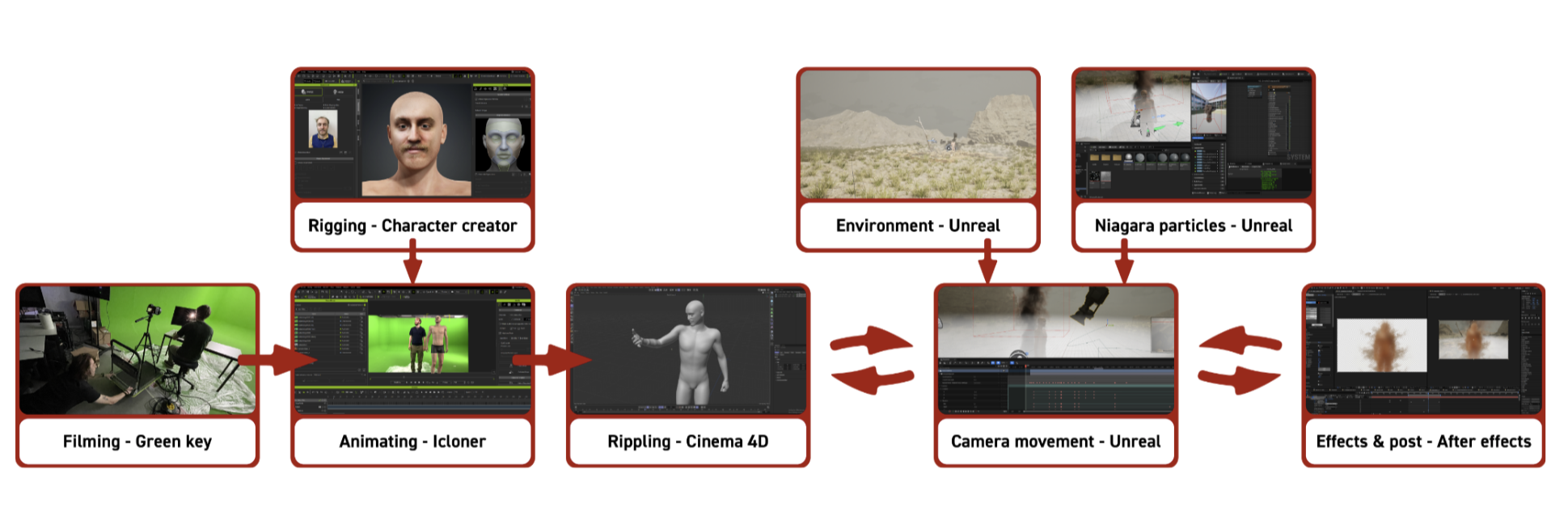
Step 01 – Filming (Green Screen & Motion Capture)
The production started with filming on a green screen stage. The required shots were recorded according to the storyboard, including both reference footage and motion capture performances.
The captured footage served two purposes:
- providing visual reference for the project
- supplying motion data for the digital character animation
The resulting motion capture recordings formed the foundation of the character’s movement throughout the film.
Step 02 – Character Rigging (Character Creator)
A digital character was created in Character Creator using photographic reference material of the actor.
The software automatically generated a fully rigged human model, eliminating the need for manual character modeling and rigging. The resulting character was prepared for animation and exported to the next stage of the pipeline.
The trained LoRA is integrated into the Promptable AI Camera workflow and becomes one of the key components of the real-time generation process.
Step 03 – Character Animation (iClone)
The rigged character was imported into iClone.
Motion capture recordings from the previous stage were processed and transferred onto the character skeleton. The animation was refined and adjusted where necessary to match the intended timing and movement of the storyboard.
The final animated character was exported as an FBX file for further processing.
Step 04 – Ripple Simulation (Cinema 4D)
The animated FBX character was imported into Cinema 4D.
Procedural ripple effects were created using field effectors and deformers. These ripples simulated invisible droplets impacting the skin and propagating across the body.
The ripple animations were distributed across the character and synchronized with the different scenes of the film. Once completed, the simulations were baked and exported as Alembic geometry caches.
Step 05 – Environment Creation (Unreal Engine)
The virtual environments were created inside Unreal Engine.
Landscape elements, atmospheric fog, lighting, and scene composition were assembled to create the misty world depicted in the film. The environments were designed to support the narrative progression and visual transitions of the character.
Step 06 – Niagara Particle Effects (Unreal Engine)
Additional visual effects were developed using Unreal Engine’s Niagara particle system.
These effects included:
- smoke simulations
- pixel particles
- dissolving body fragments
- atmospheric particle systems
The particle systems were customized through parameter adjustments such as density, lifetime, velocity, color, and emission behavior.
Step 07 – Camera Animation & Scene Assembly (Unreal Engine)
The Alembic geometry caches, environments, and particle systems were combined inside Unreal Engine.
Camera movements were animated in Sequencer and synchronized with the character animation and visual effects. Scene timing, transitions, lighting, and effect activation were refined during this stage.
The completed scenes were then rendered for post-production.
Step 08 – Compositing & Post-Production (After Effects)
The rendered sequences were imported into After Effects.
Additional smoke effects, compositing operations, and final visual adjustments were added. Green screen footage captured during the filming stage was keyed and integrated where required.
The project was finalized through color corrections, visual refinements, and consistency checks across all shots.
Step 09 – Iteration & Refinement
After reviewing the initial version, the workflow was repeated and refined.
Motion capture performances were re-recorded, environmental consistency was improved, and visual effects were further optimized. Several technical adjustments were implemented to accommodate larger animation files and improve interoperability between the different software packages.